Aqara Smart Lock U50: Keyless Entry That Actually Works
The front door is how 34% of burglars enter a home — and most of us still protect it with a pin tumbler lock design unchanged since Linus Yale Jr. patented it in 1861. I spent years doing exactly that, until one rainy Tuesday night with four grocery bags in each hand finally broke me.
The Night I Finally Got Fed Up With Keys
It was 9 PM. I had four bags in each hand, it was raining, and my keys were somewhere inside my bag. “Somewhere” is doing a lot of work in that sentence.
I set everything down on the wet porch steps, dug through my purse for two solid minutes, finally got the door open, and walked in soaking wet. One paper bag gave up completely on the threshold. Two cans of coconut milk rolled across the kitchen floor. Great Tuesday.
The frustrating part? I had a reasonably smart home. Philips Hue bulbs that triggered at sunset. An ecobee thermostat I could control from my phone across the country. But my front door still demanded a physical key like it was 1987.
Three months later I locked myself out — for the third time in twelve months. A locksmith on a Sunday afternoon cost me $130 and a two-hour wait sitting on my own porch in January. After that, I did what I should have done two lockouts earlier: I actually researched smart locks seriously, instead of assuming they were gimmicky gadgets for tech enthusiasts with too much money and too little to do.
What I found was more interesting than I expected. The technology had matured significantly, and the problem with traditional locks wasn’t just inconvenience — there were real security gaps I’d been ignoring for years.
Why Your Standard Deadbolt Is Working Against You
A quality Grade 1 deadbolt resists physical force well. That part is true. But most home break-ins don’t involve battering rams — they exploit smarter vulnerabilities that a traditional lock can’t address.
The Key Copy Problem Nobody Talks About
Think through every person who’s had a key to your place. The previous tenant. An ex who helped you move in. The plumber you hired eighteen months ago. Your neighbor who checked on your plants during a two-week trip in 2024. Do you know with certainty that none of those copies still exist?
Most of us can’t answer that honestly. Rekeying a lock costs $20–$50 per cylinder and takes fifteen minutes, but almost nobody does it unless there’s been an actual incident. With a smart lock, you never hand out physical copies. You create digital access codes that disappear in 30 seconds from your phone. A contractor gets a temporary code that expires the day the job ends. Your sister gets permanent access. When someone returns their key — or doesn’t — you delete the code. That’s it.
Lock-Bumping: A 10-Second Attack Most People Have Never Heard Of
Standard pin tumbler locks are vulnerable to a technique called lock bumping — using a specially cut bump key to open a lock in about 10 seconds without the original. Bump keys are widely and legally available, and the technique doesn’t require professional skill. High-security cylinders like Medeco or Mul-T-Lock resist this, but they cost $120–$180 just for the cylinder, and the vast majority of homes don’t have them.
Quality smart locks sidestep this entirely. The primary unlock mechanism — keypad, NFC tap, phone — doesn’t use a traditional keyway at all. Even models that include a physical key backup cylinder use it so rarely in daily life that it stops being the primary security surface worth attacking.
The Locked-Up Anxiety Nobody Admits To
Ask smart lock owners what they miss most about traditional locks. You’ll get silence. Ask what they love most, and 80% will say the same thing: auto-lock. Not voice control. Not remote monitoring. Auto-lock.
I used to lie awake genuinely wondering whether I’d locked the front door after taking the trash out. An absurd thing to lose sleep over, and yet it happened consistently. With auto-lock set to a 30-second timer, that mental loop is gone. The app shows lock status in real time. Last spring I confirmed my front door was secured from a departure gate in Denver without breaking stride or pulling up a laptop.
What a Smart Lock Actually Needs to Get Right
Over 18 months I tested four locks: the Schlage Encode Plus ($250), the Yale Assure Lock 2 ($155), the August Wi-Fi Smart Lock Pro ($250), and the Eufy Smart Lock ($99). Each had real strengths. Each had at least one deal-breaker. Here’s the checklist I built from that experience:
- Reliable local connectivity — Bluetooth or Thread built-in. Locks tied to a proprietary hub that can go offline and strand you outside are unacceptable for a primary entry point.
- Matter support — The universal smart home standard means the lock works with HomeKit, Google Home, Alexa, and SmartThings simultaneously. No platform lock-in, no workarounds.
- Physical key backup — Non-negotiable. When the battery dies, the network drops, or the app misbehaves, you need a way in that doesn’t involve calling a locksmith at midnight.
- Battery life over six months — AA or AAA batteries you can swap in 60 seconds beat proprietary rechargeable packs that need a specific cable you will inevitably lose.
- Apple Home Key or equivalent NFC unlock — Tap your iPhone or Apple Watch to unlock instantly. No app loading, no Bluetooth handshake delay. Sounds like a minor convenience. In daily life it becomes the feature you use most.
- 30-minute installation — Any lock requiring professional installation or more than an hour of effort excludes most renters and a significant portion of owners. Retrofit deadbolt designs that fit standard prep holes are the right call.
- Remote guest access management — Create, schedule, and revoke codes without being home. This is table stakes now.
The Schlage Encode Plus clears 5 of 7. The Yale Assure Lock 2 clears 4. The August Pro also hits 4 but adds mechanical complexity with its interior-only add-on design. One lock cleared all seven, at nearly half the Schlage’s price.
Aqara U50: My Honest Take After Six Months
If you’re in the Apple ecosystem, buy this lock. Stop deliberating.
The Aqara Smart Lock U50 at $109.99 is the only keyless deadbolt I’ve tested that checks every box above without asking $250 for the privilege. Apple Home Key, native Matter support, Google Home, Alexa, and IFTTT — all functional, all in one device that costs less than two locksmith visits.
Apple Home Key: The Feature That Changes Daily Routines
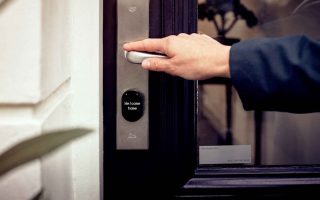
Raise your wrist toward the lock. Door opens in under a second. That’s it. I use this method for roughly 90% of my entries at home. No app launch. No Bluetooth connecting. No passcode. NFC communication between the U50 and my Apple Watch is nearly instantaneous.
In practice: hands full of grocery bags, gym bag over one shoulder, door opens as I reach for the handle. The U50 fixed the exact problem that drove me to buy a smart lock in the first place. The Schlage Encode Plus also supports Home Key — but at $140 more, there’s no reason to pay that premium for this feature alone.
Build Quality and Installation
Installation took 22 minutes with a standard Phillips screwdriver. No drilling, no special tools. The U50 replaces your existing deadbolt completely rather than attaching to the interior thumb-turn like the August Pro. The result looks like a normal door, not a retrofitted gadget. Matte black finish is clean and doesn’t collect fingerprints obviously. The keypad backlight activates on touch and dims after 10 seconds to preserve battery — a small detail that matters.
The touch keypad works reliably with gloves. That sounds minor until January.
Real Battery Performance Over Time
Six months in, with 8–10 unlocks per day across multiple people in my household, the app reports approximately 40% battery remaining on the original set of AAs. That puts me on track for 10–12 months of heavy daily use per set — significantly better than the August Pro, which dropped to 60% battery in under three months of similar load. When they eventually run out, you pull four standard AAs from a kitchen drawer. No proprietary cable required.
Aqara U50 vs. Schlage Encode Plus vs. Yale Assure Lock 2
For anyone comparison shopping, this is the practical breakdown across the three locks worth considering:
| Feature | Aqara U50 ($109.99) | Schlage Encode Plus ($250) | Yale Assure Lock 2 ($155) |
|---|---|---|---|
| Apple Home Key | Yes | Yes | No |
| Matter Support | Yes (native) | Partial (firmware update required) | Yes |
| Google Home / Alexa | Yes | Yes | Yes |
| Primary Connectivity | Bluetooth / Thread | Wi-Fi built-in | Wi-Fi (add-on module) |
| Estimated Battery Life | 10–12 months | 6–9 months | 6–8 months |
| Physical Key Backup | Yes | Yes | Yes |
| Auto-Lock | Yes | Yes | Yes |
| User Rating (2026) | 4.1/5 (631 reviews) | 4.5/5 (4,000+ reviews) | 4.3/5 (1,200+ reviews) |
| Remote Access Hub Required | Yes (Apple TV/HomePod) | No | No (with Wi-Fi module) |
The Schlage wins on build quality and has a deeper review track record — which counts for something in a category where long-term reliability matters. But unless you specifically need built-in Wi-Fi to avoid relying on an Apple hub for remote access, the $140 price gap is very hard to justify. The Yale Assure Lock 2 is the better call for Android-primary households — solid Matter support, clean installation — but it loses the Home Key feature that makes the Aqara the smoother daily driver for iPhone users.
The Doorbell Camera That Completes the Setup
A smart lock answers who gets in. A doorbell camera answers who’s standing there before you decide. The two work better together than either does alone — especially when your lock can be unlocked remotely from anywhere.
What the Aqara G400 Does That Others Don’t
The Aqara Doorbell Camera G400 at $99.99 pairs naturally with the U50 because both live in the same Aqara app and HomeKit ecosystem. The G400 shoots 2K resolution with a head-to-toe field of view — meaning you see the whole person standing at your door, not just a face cropped by a standard fisheye lens. That distinction matters when you’re deciding whether to remotely unlock for a delivery driver or a stranger who rang the wrong bell.
It’s wired with PoE support — power over ethernet — which means zero battery management and a stable connection that doesn’t drop during 2.4GHz congestion from neighboring networks. The Wi-Fi 6 radio handles dense apartment buildings without the stuttering you get from older wireless standards. Two-way audio is clear enough for an actual conversation, not the garbled mess you get from budget doorbells under $60.
The 24/7 continuous recording capability separates the G400 from battery-powered competitors like the Ring Video Doorbell 4, which only records on triggered motion events. Continuous recording means the footage from before the motion event already exists — the 30-second window that often matters most in any incident.
HomeKit Secure Video vs. Ring and Nest Subscriptions
Ring charges $100/year for video history. Nest charges $80/year. HomeKit Secure Video is included with iCloud+ starting at $0.99/month — a plan most iPhone users already pay for. The G400 processes motion detection locally on-device, so footage isn’t being analyzed on a third-party server before you see it. For anyone who’s read about Ring’s historical data-sharing relationships with law enforcement agencies, the privacy difference here is real, not a marketing talking point.
Bottom Line
At $109.99, the Aqara U50 keyless deadbolt delivers Apple Home Key, native Matter, and full multi-platform support — a combination that cost $250 until recently. Remote access requires an Apple hub device in your home, and the app is functional but not beautiful. For daily life, it delivers exactly what it promises.
Add the G400 doorbell if you want to see who’s there before unlocking. Skip it if the lock alone covers what you actually need.
- Best for iPhone households: Aqara U50 ($109.99) — Home Key + Matter + full ecosystem at half the price of Schlage
- Best if you need built-in Wi-Fi: Schlage Encode Plus ($250) — no hub required for remote access, stronger long-term review history
- Best for Android-primary homes: Yale Assure Lock 2 ($155) — solid Matter support, clean install, no Apple dependency
- Best budget entry point: Eufy Smart Lock ($99) — basic functionality, limited integrations, good for simple keypad access without ecosystem needs
- Best doorbell pairing with U50: Aqara G400 ($99.99) — same ecosystem, HomeKit Secure Video, no mandatory subscription fee